1.3 Theory of Operation
This topic identifies the various components of Nitro, describes their purpose, and illustrates how they interact with the user, the system scheduler, the system hardware, and each other.
In this topic:
- 1.3.1 Nitro High-Level Architecture and Flow
- 1.3.2 Nitro Job Startup Architecture and Flow
- 1.3.3 Nitro Job Architecture and Processing Flow
1.3.1 Nitro High-Level Architecture and Flow
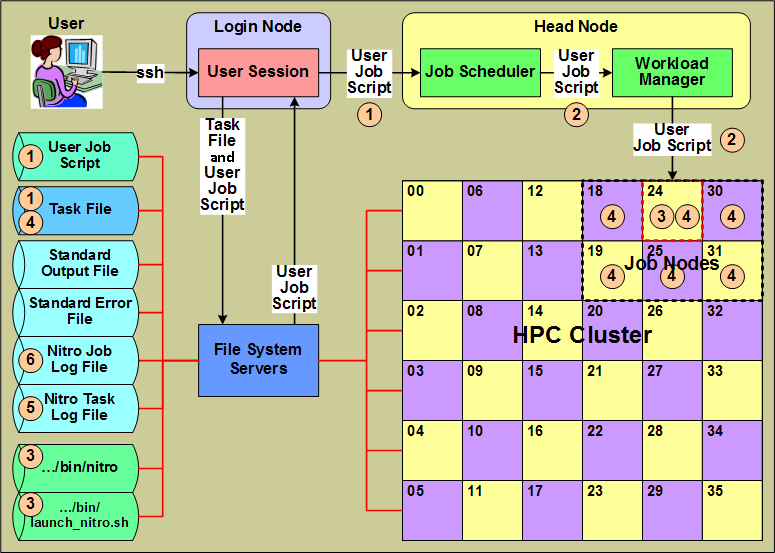
This section identifies Nitro components from a high-level Nitro product architecture perspective that most closely aligns with the perspective of a user submitting a Nitro job that uses the Nitro application to execute workloads with minimal scheduling overhead.
|
- A user creates a "user job script" that executes Nitro with a task file (containing task definitions created by the user) that execute the user's workloads, and submits the job script to the system's job scheduler. The user job script can be scheduler-agnostic, which means the user can submit the same script to different schedulers on other systems or on the same system if its scheduler changes.
- The scheduler allocates hosts to the Nitro job and, using a workload and/or resource manager, starts the execution of the job script on one of the job's allocated hosts.
- The user job script executes Nitro (…/bin/nitro) using the Nitro launch script (…/bin/launch_nitro.sh). The Nitro launch script is scheduler-specific and allows the user job script to be scheduler-agnostic.
- Nitro reads the task file containing the user-defined task definitions and then executes the tasks on its allocated hosts. A Nitro task definition is the equivalent of an HTC job running an application in that the user converts individual HTC jobs previously submitted to a scheduler into tasks executed by Nitro.
- As tasks complete their execution, Nitro records information for each task in the Nitro task log file.
- As Nitro processes task definitions from the task file and executes them, Nitro periodically updates the Nitro job log file with job progress and statistical task information to keep the user informed of its progress.
Also while Nitro executes, it records information about its environment and progress in the job's standard output file. Likewise, any unusual or unexpected errors it encounters it records in the job's standard error file.
1.3.2 Nitro Job Startup Architecture and Flow
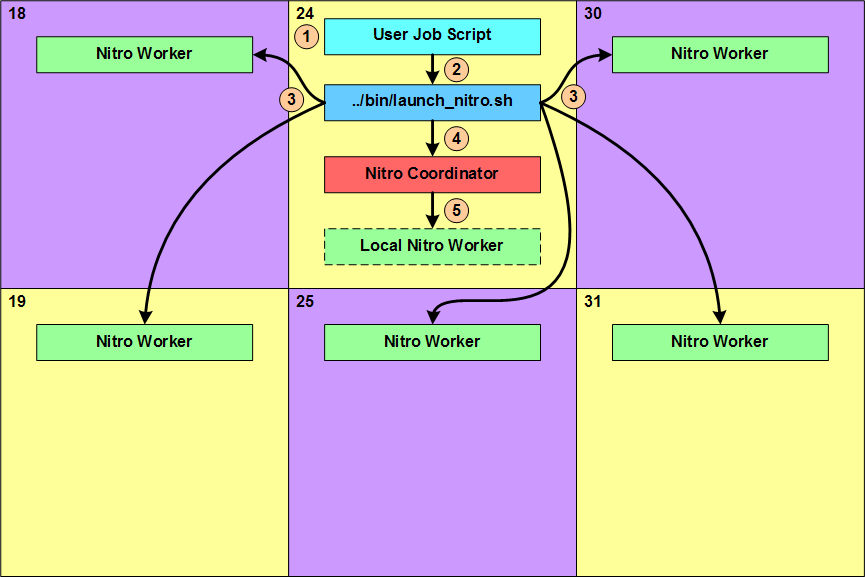
This section identifies Nitro components from a job-level architecture perspective and indicates which Nitro components start and interact with other components during a Nitro job startup.
|
- The user job script executes and does whatever the user specified. This can include things such as setting the Nitro environment variable for the task file path, setting other Nitro-recognized environment variables with values that affect Nitro's behavior, and performing any other preparatory work needed by the tasks Nitro will execute.
- The last action performed by the user job script is to execute the Nitro launch script (…/bin/launch_nitro.sh) that starts up Nitro.
- Using scheduler- or resource manager-specific commands, the Nitro launch script starts up one Nitro worker on each of the hosts allocated to the Nitro job.
- Lastly, the Nitro launch script starts up the Nitro coordinator on the host on which it is executing.
- If the user job script or the Nitro launch script specified the Nitro coordinator should start up a Nitro worker (Local Nitro Worker) on its host, the coordinator does so after it starts up.
1.3.3 Nitro Job Architecture and Processing Flow
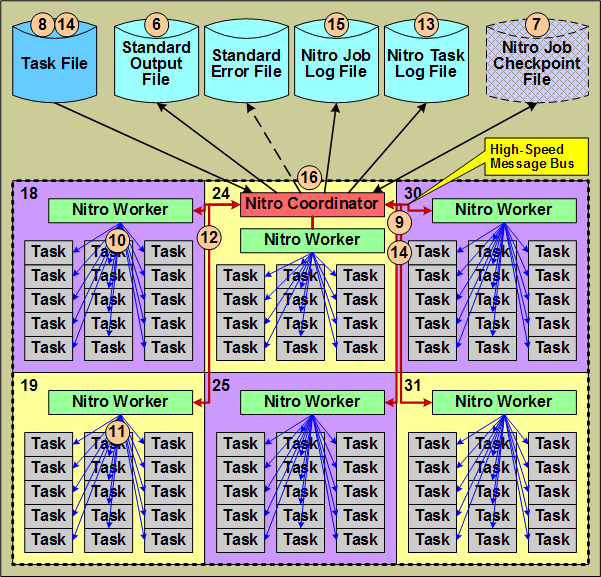
This section identifies the other Nitro components used and/or produced by the Nitro coordinator from a job-level architecture perspective and shows their interactions.
This section continues the job-level perspective narrative relative to Nitro's operation shown in 1.3.2 Nitro Job Startup Architecture and Flow.
|
- The Nitro coordinator outputs information about its environment, including file path information, the job itself (with the job id), to the job's Standard Output File.
- Nitro coordinator checks for the existence of a Nitro job checkpoint file. If it is present, the coordinator reads the checkpoint file and resumes the Nitro job; otherwise, the Nitro coordinator creates a checkpoint file for the Nitro job.
- The Nitro coordinator opens and starts reading the task file in the user job script or via an environment variable. If the checkpoint file already exists, the coordinator resumes reading the task file from where it left off and reassigns any uncompleted tasks to workers for execution.
- The Nitro coordinator processes the task definitions in the task file and creates task "assignments" from the task definitions in the task file that it sends to the Nitro workers via a message bus.
- The Nitro workers each process their own task assignment and start up tasks using their "task launch" threads. Each task launch thread starts up and executes one task.
- When a task finishes executing, the worker asynchronously uses the task launch thread to obtain statistical information about the task's execution.
- When all tasks within a task assignment have completed, the worker returns the tasks' statistical information to the coordinator via the message bus and then starts processing its next task assignment.
- The coordinator records the tasks' statistical information in the Nitro task Log file
- The coordinator continues reading task definitions from the task file, creating task assignments, and sending the task assignments to the workers. To keep the workers busy (fully utilizing the hosts allocated to the Nitro job), the coordinator sends another task assignment to a worker when the worker processed a majority of the current task assignment (while worker still has tasks in its queue). This overlapping of task assignments keeps all host cores executing workload for a very high percentage of the time.
- The coordinator periodically updates the Nitro job's statistical information in the Nitro job log file. The user can refer to the job log file to follow the Nitro job's progress.
- When the coordinator has reached the end of the task file and the workers have executed all tasks, the coordinator shuts down the workers, deletes the checkpoint file, and then terminates itself. At this point the user job completes.

A user can take advantage of restarting a Nitro job from where it left off if the user or an administrator cancelled the job or the scheduler preempted the job.